
Create a Wallet
Understand seed phrases and backup responsibility before creating a wallet.
Open guide →From multi-chain assets, network selection, sending and receiving to DApp connections, approval review, network knowledge, and wallet security, imtoken organizes important actions into a workflow you can understand and verify.
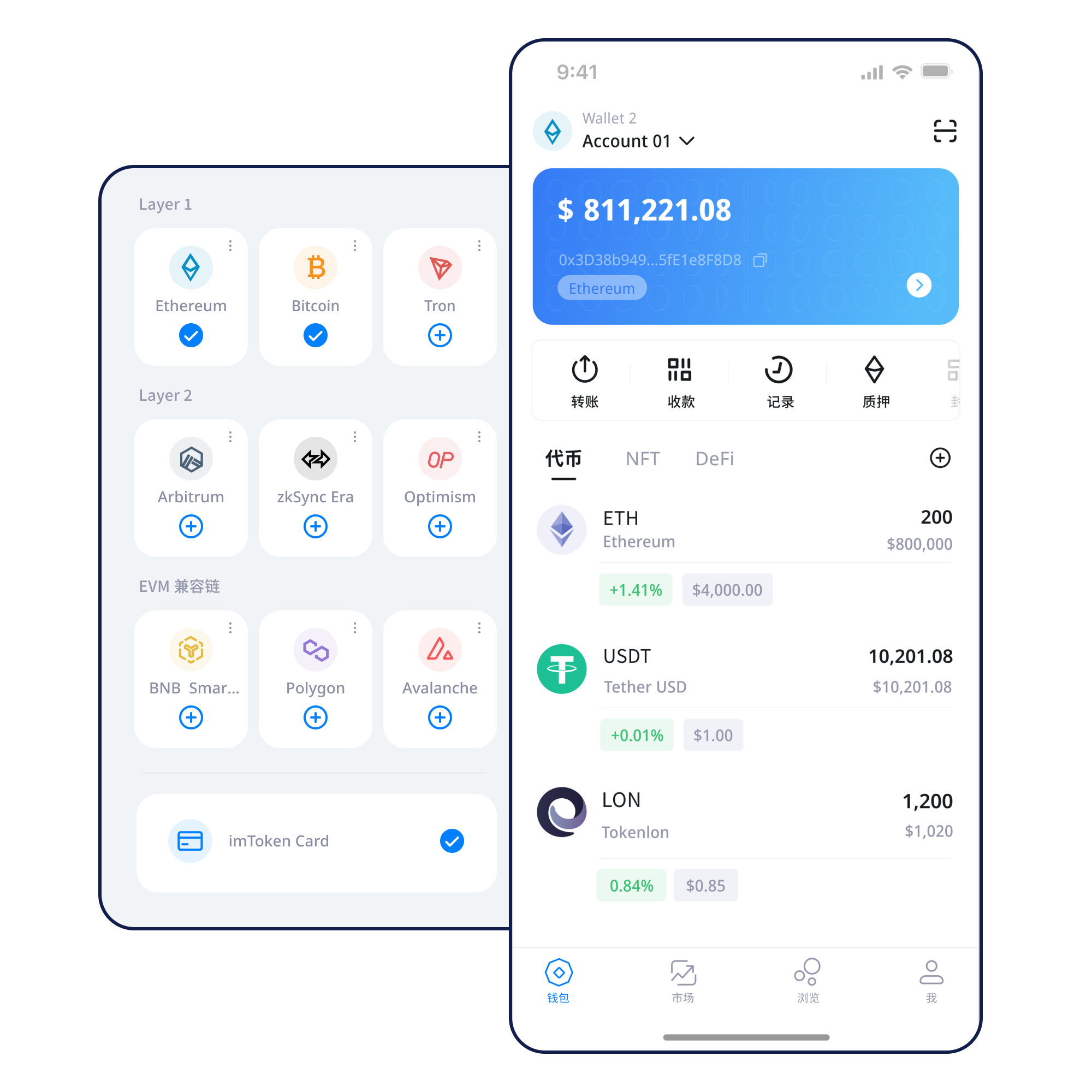
Start with the task, then move into the detailed guide. Each path leaves room to verify addresses, networks, amounts, signatures, and approvals.
Understand seed phrases and backup responsibility before creating a wallet.
Open guide →Prefer offline storage and avoid screenshots, chats, or cloud uploads.
Open guide →Make sure the receiving address and sender network match.
Open guide →Review address, network, amount, and gas before sending.
Open guide →Verify the domain, then review account, signature, and approval requests.
Open guide →Viewing assets across networks requires attention to network differences, addresses, and confirmations rather than relying on token names alone.
Understand multi-chain networks →
Manage networks, review assets and transaction history, and verify the account, network, and request before connecting to a DApp.
Explore the app →Verify the address and network before receiving; review amount, gas, and transaction hash when sending.
Read transfer guide →A browser connection enables DApp access and request review; it does not automatically approve later signatures or token permissions.
Learn about web connections →Seed phrases and private keys are controlled by the user. Offline backups, approval review, phishing awareness, and transaction checks work together as long-term security habits.
Open Security Center →
All network explanations are present directly in the page content. The tabs only change reading focus, so the full text remains readable even when interactive behavior is unavailable.
Multi-chain support does not make every network interchangeable. Verify address format, fee token, transfer route, and destination network.
Read guide →Public chains use nodes, blocks, and consensus to record transactions. Block height, hashes, and confirmation counts help explain on-chain status.
Read guide →
EVM networks share a compatible execution model, but chain IDs, gas assets, contract addresses, and risks can still differ.
Read guide →
Layer 2 systems relate to mainnet through settlement or security mechanisms. Cross-layer transfers require route, direction, and confirmation checks.
Read guide →
Gas reflects execution cost while confirmations describe transaction inclusion progress. They answer different questions.
Read guide →Use the official download entry rather than unknown links or chat attachments.
Understand backup responsibility when creating; handle recovery information only in a trusted wallet environment when importing.
Keep the seed phrase offline, never disclose private keys, and do not treat screenshots as a durable backup.
Verify the asset network, destination network, fee token, and address format.
Verify the network when receiving and re-check address, amount, and fees before sending.
Check results by transaction hash, read DApp requests before signing, and periodically review permissions you no longer need.
Review each signature and approval independently. Verify the DApp domain first, then the requested account, network, signature content, and spender, and disconnect sessions you no longer need.
Web3 guide →Seed phrases and private keys should remain under the user’s control and should preferably be backed up offline. Official personnel will not ask for them or for verification codes. When using a DApp, approving permissions, or transferring assets, independently verify the domain, address, network, amount, and permission scope. On-chain transactions usually cannot be reversed unilaterally by a wallet, so security comes from reviewable decisions rather than broad security promises.
Open Security Center →Addresses are public receiving identifiers, seed phrases and private keys control wallet access, networks determine where assets and transactions live, gas pays for execution, and transaction hashes help verify outcomes. DApp connections, signatures, and approvals are the interactions that deserve the most deliberate review when entering Web3.
Start learning →Ethereum PoS uses validators to participate in block proposal and validation. Reward sources, network state, withdrawals, and exits are governed by protocol rules rather than a fixed annual return.
Learn about Ethereum staking →Staking outcomes are uncertain. Rewards can change, exits can involve waiting periods, validators can face protocol penalties, smart contracts introduce technical risk, and digital asset prices can fluctuate.
PoS & validator basics →A wallet address is a public identifier used to receive assets on a blockchain. It can be shared for receiving, but the address and network must match. A public address is not a private key.
A seed phrase commonly restores a set of wallet accounts, while a private key controls signing for a specific address. Both are highly sensitive control credentials and should never be sent to anyone.
The same asset can exist on different networks, with different fee tokens and transfer routes. A network mismatch can prevent assets from arriving as expected.
Gas is the network fee required to execute a transaction or smart-contract action. It depends on network rules, transaction complexity, and current congestion.
A transaction hash is a unique on-chain identifier that can be checked in the relevant block explorer to review status, block height, parties, and fees.
No. A connection usually establishes a session or shares account information. Signatures, transactions, and token approvals should still be reviewed separately.
No. A signature can represent login, authorization, or transaction intent. Verify the domain, source, message, and requested permissions, and reject anything you do not understand.
A token approval lets a specified address or contract operate a token within a defined allowance. Review the spender and amount, and consider revoking permissions you no longer use.
Review backup, network, and transaction-check principles before downloading.
Download imtoken